Church Donation Tracking Software Made Simple
Discover how church donation tracking software can streamline giving, automate reporting, and build donor trust. A practical guide for your ministry.
Think of church donation tracking software as a specialized financial tool built to help ministries record, manage, and report on every contribution that comes in. It’s designed to replace cumbersome spreadsheets and paper ledgers, creating one central place for all your giving activities. The goal? To bring clarity, efficiency, and greater financial transparency to your church's finances.
Why Move Beyond the Offering Plate

For many church treasurers and administrators, managing donations feels like navigating a winding road with an old, tattered paper map. You spend hours manually keying in data from offering envelopes, trying to reconcile cash and checks, and fighting with spreadsheets just to pull a simple report. It's a system that’s ripe for errors and lost time, leaving you feeling constantly behind.
Making the switch to church donation tracking software is like swapping that paper map for a modern GPS. It's not just about getting a new tool; it's about gaining a clear, real-time picture of your ministry’s financial health. Tedious data entry gets replaced by automated workflows, freeing up your team's valuable time to focus on people, not paperwork.
The Headaches of Manual Tracking
Sticking with old-school methods creates nagging problems that can quietly get in the way of a church's mission. These pain points are all too familiar in congregations of every size:
- Time-Consuming Data Entry: Volunteers and staff can sink dozens of hours each month just recording individual gifts. That's a lot of time spent on a task where one slip of the keyboard can create errors.
- Difficult Reporting: Need a giving report for the board meeting? It often turns into a major project, delaying important financial conversations and decisions.
- Lack of Insight: Spreadsheets are terrible at revealing the story behind the numbers. It's nearly impossible to spot giving trends, see who gave for the first time, or figure out which campaigns are truly connecting with your members.
- Inaccurate Fund Management: Manually separating designated gifts is a huge challenge. You have to be meticulous to ensure money for the building project or a special benevolent fund doesn't get mixed up with the general tithe.
A dedicated software system moves your church from simply counting money to actively stewarding resources. It provides the financial clarity needed to plan for the future, thank donors personally, and operate with the transparency your congregation deserves.
This move toward smarter tools is part of a much bigger picture. The global market for church management software is expected to grow from $500 million in 2025 to roughly $1.5 billion by 2033. This surge is driven by ministries just like yours looking to automate tasks and gain a better handle on their finances. You can explore more trends in this detailed market analysis.
At the end of the day, this software becomes a cornerstone for financial stewardship, building trust and empowering your ministry's vision.
The Core Features That Power Your Ministry
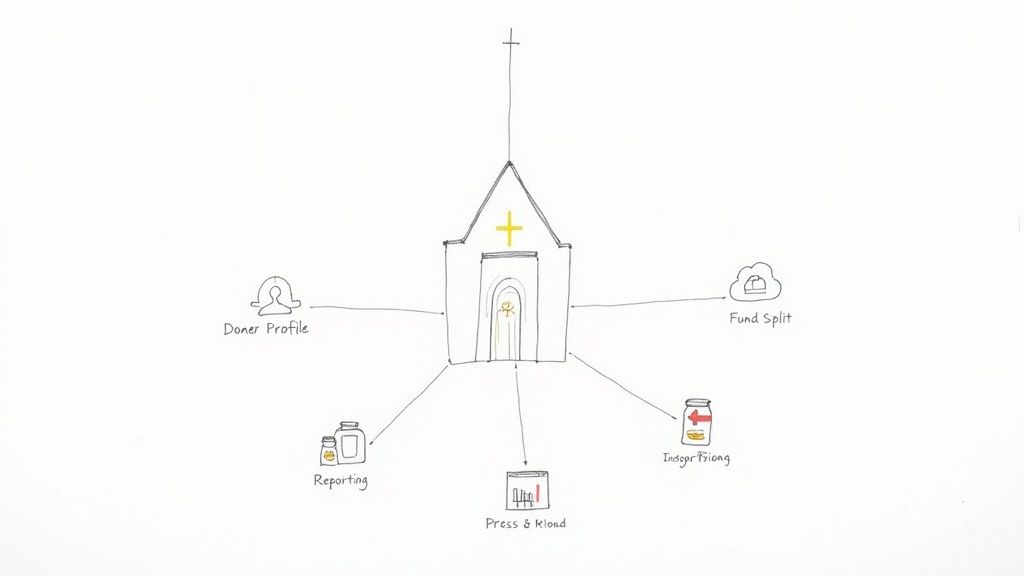
At its heart, church donation tracking software is so much more than a digital collection plate. It’s the financial command center for your ministry, packed with tools designed specifically for the unique way a church operates. When you move on from spreadsheets and manual ledgers, you’re not just digitizing a process; you’re adopting a system where every piece works together to bring clarity and sanity to your finances.
Think of these features as the essential parts of an engine. Each one has a specific job, but they all need to work in sync to drive your ministry forward. Let’s break down the core components you should expect to find and see how they can change your day-to-day operations for the better.
A great way to understand these components is to see them side-by-side. The table below outlines the essential features, what they actually do, and why they are so critical for the health of your church's finances.
Essential Features in Church Donation Tracking Software
| Feature | What It Does | Why It Matters for Your Church |
|---|---|---|
| Donor Management | Creates a detailed profile for each donor, tracking their entire giving history and contact information in one place. | Moves you from a list of transactions to a system for building relationships. You can personally thank first-time givers and acknowledge faithful supporters. |
| Fund Tracking & Gift Splitting | Allows you to set up separate digital "buckets" (funds) and easily split a single donation across multiple designations. | Solves the headache of designated giving. A $100 gift can be instantly split between the General Fund, Building Fund, and Missions without manual math. |
| System Integrations | Connects with your other key tools, like online giving platforms, accounting software, and bank accounts. | Creates an automated workflow that eliminates double-entry. Donations flow seamlessly from your giving app to your ledger, saving hours of work. |
| Reporting & Tax Statements | Generates insightful reports on giving trends and automatically creates year-end tax statements for your congregation. | Turns raw data into clear insights and transforms a weeks-long administrative burden into a task that takes just a few clicks. |
| Security & Access Controls | Protects sensitive financial data with encryption and allows you to set specific user permissions for staff and volunteers. | Builds trust with your congregation by ensuring their information is secure. You can control who sees what, protecting privacy and financial integrity. |
Each of these features plays a vital role in creating a robust and reliable financial system for your ministry. Let’s dive a little deeper into how they work in the real world.
Comprehensive Donor Management
Good stewardship starts with knowing your givers. Modern software goes way beyond a simple list of names and addresses. It builds a rich, detailed profile for every donor or family, serving as a complete history of their financial partnership with the church.
This central hub lets you see every contribution someone has made over time, note their communication preferences, and even add personal details. This is absolutely key for building relationships. For example, you can easily pull a list of all first-time givers from the last month to send a personal welcome note, or you can recognize long-time supporters for their consistent generosity.
By transforming a simple list of transactions into a relationship management tool, the software helps you nurture a culture of giving. It allows you to thank people personally and effectively, which fosters a deeper connection to the ministry's mission.
Precise Fund Tracking and Gift Splitting
One of the biggest bookkeeping headaches for any church is managing designated giving. A single check or online gift might need to be split between the general tithe, the building fund, and a specific missions trip. Trying to track all of that by hand is a recipe for confusion and mistakes.
This is where dedicated fund tracking is a true game-changer. The software lets you create separate digital "buckets" for every designated purpose. When a donation comes in, you can effortlessly allocate it to the right funds.
- General Fund: For tithes and offerings covering day-to-day operational expenses.
- Building Fund: For capital campaigns and facility maintenance projects.
- Missions Fund: For supporting your local and international outreach partners.
- Benevolent Fund: For providing assistance to those in need within your community.
Imagine a donor gives $100 online and specifies in the memo that $75 is their tithe and $25 is for the youth group's summer camp. The software automatically splits this single transaction, ensuring every dollar is recorded and tracked according to the donor's intent without anyone needing to pull out a calculator.
Seamless Integrations with Other Systems
Your donation software shouldn't be an island. Its real power is unlocked when it talks to the other tools your church relies on, creating a truly automated financial ecosystem. This finally puts an end to the dreaded task of double-entry, saving your team countless hours and reducing the risk of human error.
Key integrations to look for include:
- Online Giving Platforms: Connections to tools like Pushpay, Stripe, or Planning Center Giving mean that donations made online, via text, or through a kiosk flow directly into your tracking system. No manual importing needed.
- Accounting Software: A direct link to fund accounting software, like the one offered by Grain, or traditional systems like QuickBooks ensures your giving records perfectly match your financial ledgers.
- Bank Feeds: By connecting to your church's bank accounts, the software can help reconcile deposits automatically, confirming that what was recorded in the system is what actually landed in the bank.
These connections transform a series of tedious, manual steps into a single, automated workflow, giving your finance team complete confidence in the accuracy of your records.
Insightful Reporting and Tax Statements
Data is useless if you can't make sense of it. The best church donation software comes with powerful reporting tools that turn raw numbers into actionable insights. With just a few clicks, you can generate reports that show giving trends over time, track the progress of a fundraising campaign, and give you a clear, immediate overview of your church's financial health.
Even more importantly, this feature simplifies one of the most time-consuming annual tasks: creating year-end giving statements. Instead of spending weeks in January manually compiling donation histories for every single family, the software can generate accurate, professional-looking statements in minutes. This not only frees up administrative time but also gets your congregation the documentation they need for their taxes, correctly and on time.
Robust Security and Access Controls
Finally, handling people’s financial information demands the highest level of trust and security. A non-negotiable feature of any reputable software is its commitment to data protection. This includes essentials like SSL encryption to protect data as it travels online and PCI compliance to ensure credit and debit card information is handled according to strict industry standards.
Beyond the technical safeguards, the software must also provide granular access controls. This simply means you can give different levels of permission to different people. For example, a pastor might have view-only access to overall giving reports, while the head treasurer has full administrative rights to enter and edit transactions. These controls ensure sensitive donor information is only seen by authorized individuals, protecting privacy and maintaining the integrity of your financial processes.
How to Choose the Right Software for Your Church
Trying to find the right donation software for your church can feel overwhelming. With so many options on the market, it’s easy to get lost in flashy marketing and long feature lists. The secret is to tune out the noise and zero in on what truly matters for a small or medium-sized church, which is often run by a handful of dedicated volunteers. The goal isn't to find the most powerful system, but the most effective one for your ministry.
Think of it like buying a car. You wouldn't buy a massive semi-truck with a complicated dashboard just to drive your family to school. A reliable, easy-to-use minivan gets the job done perfectly. The best software is the one that fits your congregation’s size, budget, and technical comfort level without piling on features you’ll never use.
This practical mindset helps you cut through the hype. By focusing on a few core criteria, you can confidently pick a tool that will actually empower your ministry, not create another administrative headache.
Your Evaluation Checklist for Church Giving Software
To make a smart decision, you need a clear set of standards. These points are designed for the real-world needs of most churches, where stewardship, simplicity, and security are the top priorities.
True Fund Accounting Compatibility: This is the most important one—it’s non-negotiable. Unlike a business, a church has to track money by its designated purpose (like the General Fund, Missions Fund, or Building Fund). Your software must be built from the ground up to handle this fund accounting structure, making sure restricted donations always go exactly where they’re supposed to.
Smart Automation Features: Let's be honest, the whole point of software is to save time. Look for automation that handles the tedious stuff, like processing recurring gifts and automatically sending donation receipts. This frees up your team from hours of manual data entry and makes sure your givers feel appreciated right away.
Ironclad Data Security: Your congregation is trusting you with their sensitive financial details. Any software you consider must use industry-standard security like SSL encryption and be PCI compliant to protect every transaction. This isn’t just a technical feature; it's a fundamental issue of trust and integrity.
Simplicity and Ease of Use: The people on your finance team are likely volunteers, not tech wizards. The software should feel intuitive and be easy to get around in. A system that requires weeks of training will probably end up collecting dust and causing more frustration than it's worth.
Considering Your Budget and Scalability
Of course, cost is always a major factor for any ministry. The market for these platforms is growing quickly, with North America expected to drive 37% of the global growth between 2025 and 2029. All that competition has led to a wide variety of pricing models. Monthly costs can be as low as $30 for a small church or climb over $300 for larger ones, and many providers offer free or very cheap basic plans. It's critical to look at the full price, including any hidden processing fees, to make a choice you can stick with. You can find more on these trends in this Technavio report.
Beyond what you’ll pay today, think about where your church is headed. Does the software have different plans you can grow into? Choosing a scalable solution now can save you from the massive headache of having to switch systems in a few years.
The right software isn't just about managing today's donations; it's about building a financial foundation that can support your ministry's vision for years to come. It should feel like a partner in stewardship, not just a piece of technology.
Prioritizing Key Integrations
Donation software shouldn't be an island. Its real power is unlocked when it talks to the other tools you rely on every day.
- Online Giving Platforms: Make sure it connects seamlessly with your website's giving page or mobile app. This lets online donations flow straight into your records without anyone having to type them in manually.
- Accounting Systems: A direct link to your accounting software is a must. For churches that practice true fund accounting, a native integration with a system like Grain is perfect because it guarantees every donation is automatically posted to the correct fund in your financial ledgers.
- Bank Feeds: The ability to connect directly to your church’s bank account makes reconciling your books so much easier. You can quickly confirm that what's in the bank matches your donation records, catching any discrepancies right away.
When these systems are connected, they create a financial ecosystem that cuts out repetitive work, reduces the risk of human error, and gives you a clear, accurate snapshot of your church’s financial health at any time.
Making a Smooth Switch to Your New System
Bringing in new technology can feel overwhelming, especially when you’re handling your congregation's sensitive financial data. But here’s the good news: moving to modern church donation tracking software doesn’t have to be a nightmare. With a solid plan, the transition can be surprisingly straightforward and set your ministry up for success for years to come.
Think of it like moving from a cluttered old storeroom into a brand-new, organized library. That initial effort to sort, label, and put everything in its proper place pays off every single day afterward. By breaking the process down into four clear steps—planning, cleaning up data, migrating, and training—it becomes a project any church team can handle.
Phase 1: Planning Your Move
First things first, get a small transition team together. This doesn't need to be a big formal committee. Often, the church treasurer, a volunteer who's good with computers, and a key administrator are all you need to get the ball rolling. This small group will own the process, set a realistic schedule, and keep everyone in the loop.
A good plan should cover:
- Setting a Timeline: Pick a clear start date and a "go-live" date. For most small to medium-sized churches, a 30 to 60-day window is a realistic goal. It gives you enough time to do things right without letting the project drag on forever.
- Assigning Roles: Make it crystal clear who is doing what. When everyone knows who is in charge of cleaning up the data versus who is scheduling the training, things just run smoother. This is a great time to clarify the duties of a church administrator as they relate to the new system.
- Communicating the Change: Let your congregation know what’s happening and why. Frame it as a positive move—a step toward better stewardship and efficiency that will ultimately make the ministry stronger.
Phase 2: Cleaning Up Your Current Data
This is probably the most important part of the entire process. Moving messy, inconsistent data into a new system is like moving all the junk from your old house into your beautiful new one. You’re just creating the same problems in a new place.
Your new software is only as good as the data you put into it. A thorough cleanup beforehand ensures you start with accurate, reliable information, which is the foundation of trustworthy financial reporting.
Before you import a single file, take the time to scrub your existing records. Focus on standardizing names (is it "Jon Smith" or "Jonathan Smith"?), fixing addresses, and merging duplicate donor profiles. Make sure every past gift is tied to the right person and the right fund. A little bit of detailed work now will save you from a mountain of headaches down the road.
Phase 3: The Data Migration
Once your data is squeaky clean, it’s time for the big move. Most modern software platforms have user-friendly import tools that work with common file formats like CSV. Don't be shy about leaning on the software provider's support team here—that's what they're there for.
For a hassle-free import, follow these simple steps:
- Run a Test Batch First: Before you dump all your data in, start with a small sample of 10-20 donor records. This is a great way to catch any formatting quirks or errors without having to undo a massive upload.
- Use Their Tools: Stick to the software's specific instructions and use their import templates. This ensures your data columns line up perfectly with the fields in the new system.
- Spot-Check Your Work: After the full migration is complete, pull up several donor profiles at random. Double-check that their giving history and personal details came across correctly.
Phase 4: Training Your Team
Finally, you need to empower the people who will be using the software every day. Good training isn’t about showing them every single bell and whistle. It’s about focusing on the core tasks they'll do over and over, like entering offline checks, pulling key reports, and getting year-end giving statements ready.
Schedule a few hands-on training sessions for your staff and key volunteers. Many software companies offer free webinars or video tutorials that are perfect for this. When your team feels confident right from the start, your church can begin to see the benefits of the new system immediately.
See It in Action: From Donation to Report
It’s one thing to talk about features, but seeing how church donation tracking software actually works in the real world is what makes it all click. Let’s walk through the journey of a single $100 donation from a church member we’ll call Sarah. This simple story shows how everything—automation, accuracy, and integration—works together to bring clarity and save a ton of time.
One Tuesday morning, Sarah decides to give online. She pulls up the church’s giving portal and designates her gift: $80 to the General Fund for her regular tithe and $20 specifically to the Missions Fund to support an upcoming trip.
This is where the magic really starts.
The Instantaneous Workflow
The second Sarah hits “submit,” a whole chain of events kicks off automatically. No one has to open an envelope, decipher handwriting, or manually type numbers into a spreadsheet. It just happens.
- Step 1: Transaction Recorded: The software instantly logs the $100 transaction, noting the date, time, and Sarah's donor details.
- Step 2: Funds Allocated: It automatically splits the gift exactly as she intended, crediting $80 to the General Fund and $20 to the Missions Fund.
- Step 3: Donor Profile Updated: Sarah’s personal giving history is updated with this new contribution, keeping her record complete.
- Step 4: Receipt Sent: A personalized thank-you email and an official receipt land in Sarah’s inbox right away.
This whole sequence is over in seconds. It guarantees the donation is recorded correctly from the get-go and makes the donor feel appreciated immediately. Getting a system like this in place follows a clear path, as you can see below.
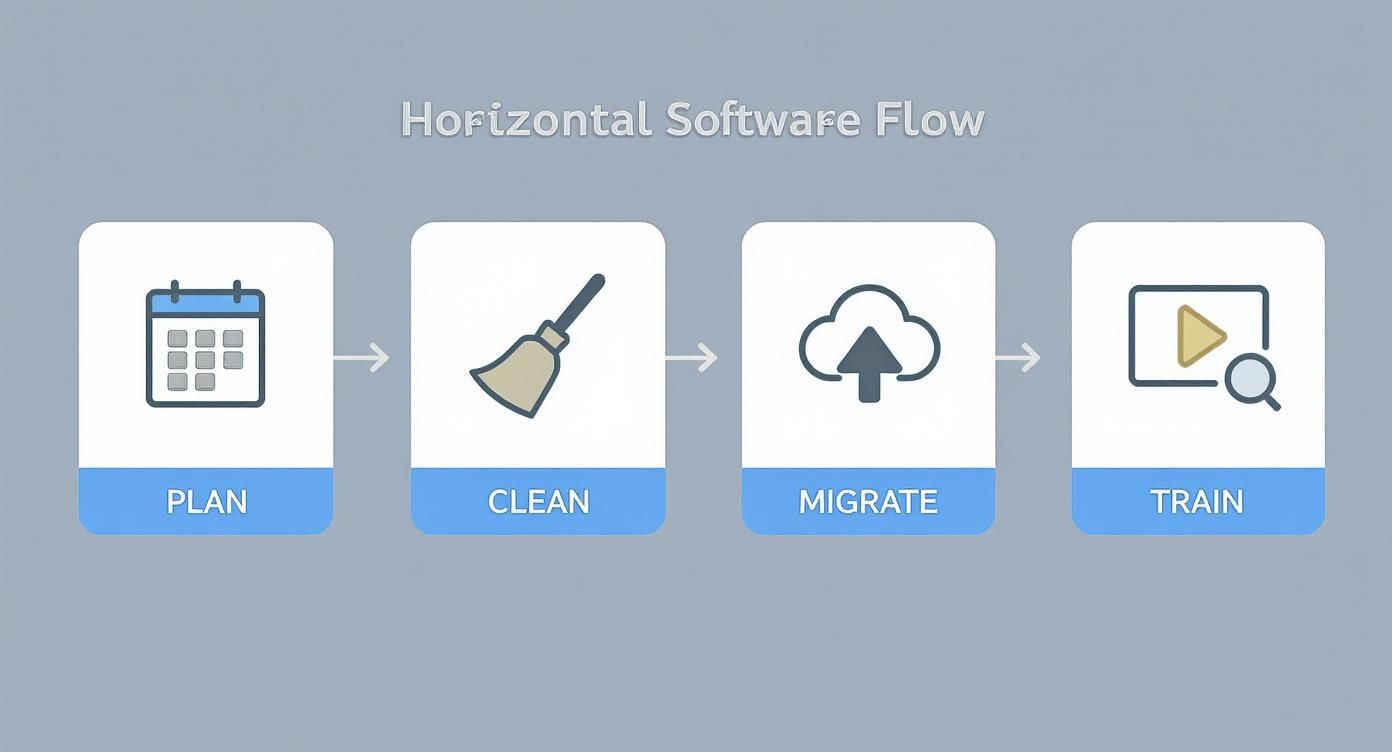
This highlights that a smooth transition isn't just about flipping a switch; it's about good planning and making sure your data is clean before you even start the migration.
Behind the Scenes: The Accounting Connection
While that initial process is impressive, the real game-changer is what happens next. Because the donation software talks directly to the church’s accounting system, Sarah’s gift doesn't just sit in a list—it flows straight into the financial ledger.
The $80 gets posted as revenue to the General Fund, and the $20 is posted to the restricted Missions Fund. This seamless sync means the treasurer doesn’t have to manually re-enter giving data, a tedious job that’s famous for causing errors and eating up volunteer hours. The integrity of your fund accounting is protected automatically.
By connecting the act of giving directly to the financial books, the software creates a single source of truth. This ensures that every report reflects the most accurate, up-to-the-minute data without manual reconciliation.
From a Single Gift to a Clear Report
Now, let's jump to the end of the month. The church treasurer needs to pull together a financial update for the board meeting. Instead of spending hours sifting through spreadsheets and matching up bank statements, she just logs into the system.
With a few clicks, she runs a "Giving by Fund" report. It clearly shows the total income for the General Fund and the Missions Fund, with Sarah’s $100 contribution perfectly accounted for in the totals. A task that used to kill an entire afternoon is now done in less than five minutes. If you want to get really good at this, our guide on church financial reporting dives into the best practices.
This simple example reveals the entire life cycle of a donation in a modern system. It starts as an act of generosity and moves seamlessly into a secure transaction, a designated fund entry, and finally, a clear, accurate report—all with minimal effort and maximum reliability.
Got Questions About Donation Software? (We've Got Answers)
Stepping into new technology, even something as helpful as church donation tracking software, can feel like a mix of excitement and a little bit of anxiety. That's perfectly normal. You've got questions, maybe even a few concerns, and that's a good thing—it means you're being a careful steward.
We've been there, and we've helped countless churches navigate this change. To make it easier, let's talk through the common questions and potential stumbles we see most often. Getting this right is less about the tech and more about avoiding a few common mistakes that can trip people up.
A Few Common Pitfalls to Sidestep
Before we jump into a Q&A, let's get a few frequent missteps out on the table. Knowing what to watch for can save your ministry a world of frustration and make sure your new software is a blessing, not a burden.
Buying the Over-the-Top, Complicated System: It’s so easy to get wowed by a demo that shows off a million features. But a small or medium-sized church just doesn't need the same beast of a system that a mega-church does. The best software is the one your team will actually use. Always choose a simple, intuitive interface over a long list of features you'll never touch.
Forgetting to Train Your Volunteers: Your treasurer and finance team are the heart of your financial operations. Just handing them a new tool without a little guidance is setting everyone up for failure. A small investment in training makes them feel confident from day one. This leads to way faster adoption and far fewer headaches down the road.
Migrating Messy Data: Moving old, messy, or duplicate donor records into a shiny new system is like moving all the junk from your old garage into a brand-new one. It defeats the purpose. The single most important thing you can do for future accuracy is to clean up your existing records before you import them.
The goal isn't just to get software; it's to find a simpler, better way to manage the resources your congregation has entrusted to you. A smooth transition is always about people and process first, technology second.
Answering Your Most Pressing Questions
Alright, let's dig into the specific questions we hear all the time from church leaders just like you.
Do we really need this if we're a small church?
That’s a fair question. If you’re a tiny house church, a well-organized spreadsheet might work just fine. But the moment you start handling designated funds (like for missions or a building project), need to issue year-end tax statements, or simply want to understand giving trends, the software pays for itself almost immediately. For a church with under 100 members, the time saved and the accuracy gained far outweigh the small monthly cost.
How does this kind of software handle non-cash donations?
Great question! Modern platforms are built for more than just cash and checks. You can easily record "in-kind" gifts, like donated sound equipment, office supplies, or even stock donations. The system lets you assign a fair market value, log it in the donor's history, and include it on their year-end statement. It ensures every act of generosity is tracked and acknowledged properly.
Seriously, how hard is it to generate year-end tax statements?
This is where you'll feel the magic. Forget spending a huge chunk of January manually piecing together giving histories. With good software, you can generate accurate, professional-looking tax statements for every donor with just a few clicks. You can print them or email them directly, turning what was once a massive administrative headache into a task that takes just a few minutes.
What kind of tech skills do we need to run this?
The best church software is designed for volunteers, not IT wizards. If you can use a website or browse social media, you already have all the skills you need. Everyday tasks—entering an offering, running a basic report, updating a donor's address—are designed to be simple and intuitive. Plus, most companies provide excellent support articles and video tutorials to walk you through anything new.
Choosing the right software is really about giving your ministry the tools for clarity and efficiency. By sidestepping those common mistakes and getting straight answers, you can make a choice that strengthens your church's financial health for years to come.
Ready to bring true clarity and simplicity to your church’s finances? Grain is the only accounting software built with a native fund accounting architecture, ensuring every donation flows automatically and accurately to its intended purpose. See how Grain can transform your stewardship. Schedule a Demo today!
Ready to simplify your church finances?
Start free with church fund accounting, or watch a product demo first.