Technology for Churches: The Ultimate Growth Guide
Your complete guide to technology for churches. Choose and integrate essential tools for giving, streaming, and management to grow your ministry.
If you're the person who gets asked, “Can you pull last month's giving by fund before tonight's board meeting?” you already know where church technology breaks down. The problem usually isn't a lack of tools. It's a pile of disconnected ones. Online gifts sit in one dashboard, event registrations in another, attendance somewhere else, and the accounting file becomes the place where a tired administrator tries to make everything agree.
About Grain Ledger: This guide includes Grain Ledger, church fund accounting software built for designated gifts and ministry funds. It connects giving platforms (Planning Center, Pushpay, Tithely, Stripe), syncs bank activity with Plaid, and produces fund-level financial reports. Schedule a demo to see how it compares for your church.
See Grain Ledger for your church
Fund accounting, giving integrations, and bank reconciliation in one platform. Free migration support for churches switching from QuickBooks or Aplos.
That arrangement works for a while. Then a designated offering comes in through a digital form, the bank deposit hits in a lump sum, and someone has to determine what belonged to missions, what belonged to the building fund, and what was unrestricted. The stress is not just administrative. It's spiritual and fiduciary. Churches don't get to be casual about donor intent.
Technology for churches matters most when it reduces that strain without creating a new one. The goal isn't to collect more software. The goal is to build a system that helps pastors, treasurers, bookkeepers, and volunteers serve people faithfully while keeping the church's money clear, traceable, and well governed.
Why Technology is No Longer Optional for Ministry
The old question was whether a church should adopt digital tools. That question is gone for most congregations. The actual question is whether the tools in place are strong enough to support ministry and stewardship without constant manual cleanup.

The shift is visible in current adoption patterns. In coverage of Pushpay's 2025 State of Church Technology report, 86% of U.S. church leaders said digital tools play a vital role in ministry, and 70% said technology has directly increased generosity within their congregations. That matters because it reframes technology for churches as ministry infrastructure, not a side project for the communications team.
The real pressure point is operations
Most leaders first feel the need for better technology in ordinary tasks:
- Giving intake gets fragmented when gifts arrive through text, app, web form, in-person card reader, and Sunday envelopes.
- Volunteer time gets wasted when the same names and numbers are entered into multiple systems.
- Board reporting slows down when every month-end close depends on spreadsheet exports and hand corrections.
- Pastoral follow-up suffers when donor, attendance, and engagement records don't connect.
A church can survive these problems for a season. It can't scale ministry well with them.
Practical rule: If your finance process depends on one person “knowing how the spreadsheet works,” your church has a systems problem, not a staffing problem.
Ministry and stewardship now run through the same pipes
Churches used to separate “ministry tech” from “back-office tech.” In practice, they're now linked. A digital guest follow-up process affects small group participation. A mobile giving experience affects generosity. Fund reporting affects trust. Streaming affects reach. None of these systems stays isolated for long.
That's why technology for churches should be evaluated as a ministry system with a stewardship core. When the foundation is sound, leaders spend less time reconstructing what happened and more time acting on what they know. When the foundation is weak, every new app adds another layer of reconciliation.
A simple truth remains. Churches don't need more gadgets. They need dependable infrastructure that supports ministry, preserves accountability, and gives leaders a clean view of reality.
Understanding the Core Church Tech Categories
Most churches don't need every tool on the market. They do need to understand the categories, because confusion usually starts when one tool is expected to do a job it wasn't built to do.
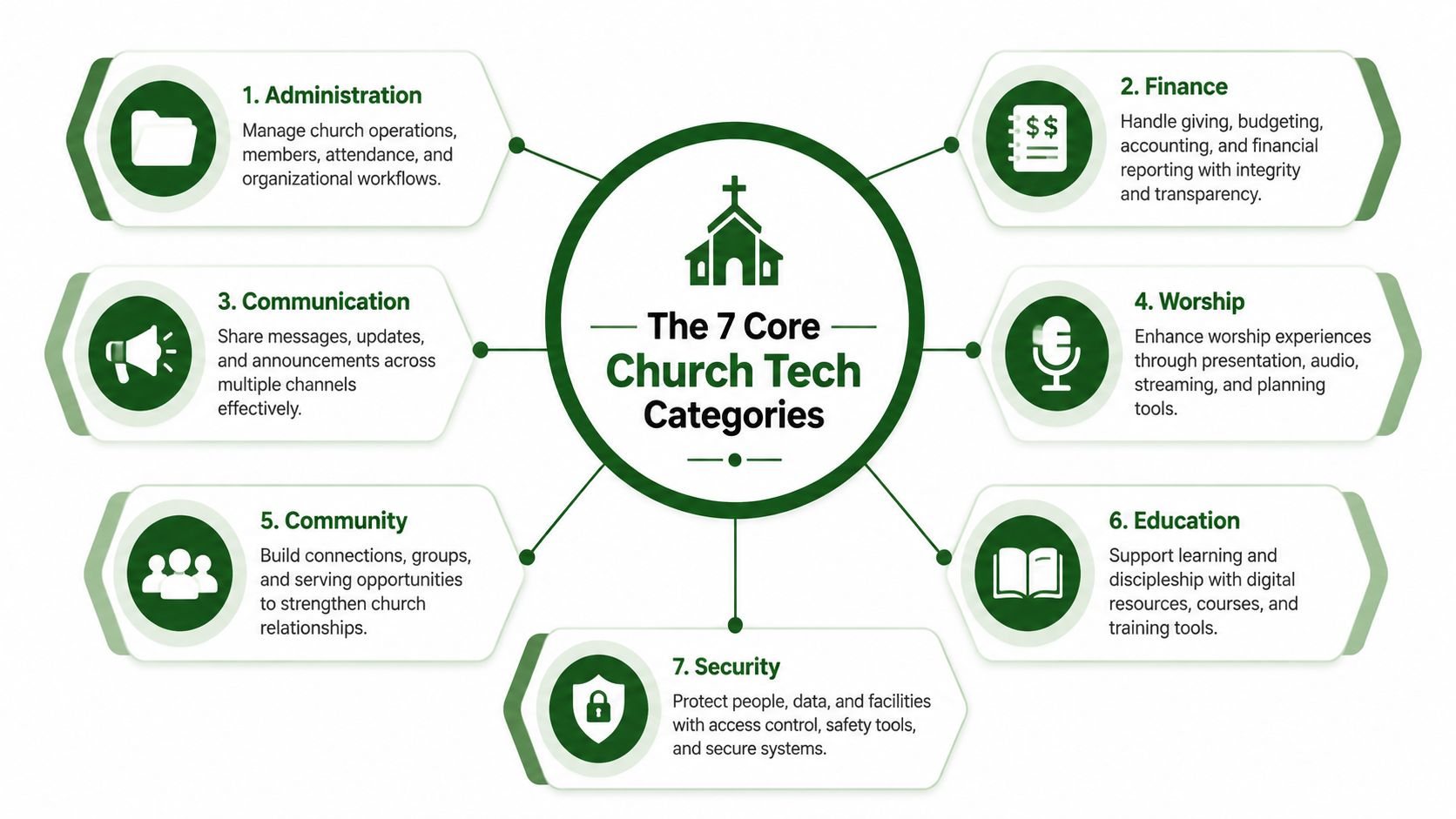
The seven pillars most churches need to map
Here's a practical way to think about the environment.
| Category | What it does | Why it matters |
|---|---|---|
| Giving and donor management | Captures donations, donor details, designations, and recurring gifts | It becomes the church's digital offering plate |
| Fund accounting | Records transactions by fund and produces finance reports that reflect donor restrictions | It protects clarity and accountability |
| Audio, visual, and streaming | Supports in-room worship and remote participation | It extends ministry beyond the building |
| Communications | Handles email, text, announcements, forms, and follow-up | It keeps people informed and connected |
| Volunteer management | Schedules teams, fills roles, and tracks service | It reduces friction for Sunday and weekday ministry |
| Member management or ChMS | Maintains household records, attendance, groups, and pastoral notes | It serves as the relationship backbone |
| Security | Covers access, permissions, device practices, and data protection | It lowers risk around people and money |
What each category feels like in daily church life
Giving and donor management is where generosity enters the system. If the giving platform is easy for members but difficult for staff to reconcile, the church has only solved half the problem.
Fund accounting is the financial nervous system. It's where the church answers the question, “What was this money for, where did it go, and can we prove that clearly?” This category deserves more attention than it usually gets.
Audio, visual, and streaming often gets the budget discussion because it's visible on Sunday. It matters. But worship technology can't carry the weight of the whole operation.
Churches often overspend on visible platforms and underspend on the systems that explain where the money went afterward.
Communications tools handle the everyday signals of church life. Service reminders, event registrations, pastoral updates, volunteer requests, and newcomer follow-up all sit here. If communications aren't connected to member records, the church starts losing context fast.
Volunteer management should be simple enough for a ministry leader to run without calling the office for help. Complex scheduling systems tend to die in churches that rely heavily on volunteers.
Member management or ChMS should be the central people record, not just a digital directory. If you're comparing options, this guide to church management software options is a useful starting point for thinking through feature fit.
Where churches usually get the categories wrong
The common mistakes are predictable:
- Using the ChMS as accounting software when it can track donors but not govern funds well.
- Using generic bookkeeping software as if church funds were simple categories rather than distinct reporting obligations.
- Adding communication apps without deciding which system owns the contact record.
- Treating security as an IT issue only when permissions and financial access are really leadership issues.
Technology for churches works better when every category has a clear job. Once that map is clear, tool selection gets much easier.
Selecting the Right Tools for Your Congregation
Feature lists are where many software decisions go sideways. Churches compare screens, watch demos, and end up choosing the platform with the most buttons instead of the one people will use well.
A better approach starts with operating reality. Who will use the system every week? A full-time finance director? A volunteer bookkeeper? A pastor who approves expenses from a phone? A ministry assistant who manages events and donor acknowledgments? The right tool is the one your actual team can run consistently.
Start with usability, not ambition
Post-pandemic adoption pushed many churches toward cloud systems, and industry summary data estimated that 75% of churches preferred cloud-based solutions over on-premise software by 2023. That shift makes sense. Cloud tools are easier to access, easier to maintain, and easier to connect across locations and roles.
Still, cloud-based doesn't automatically mean church-friendly.
Use this checklist during vendor review:
- Volunteer fit. Can a non-technical person complete ordinary tasks without a manual?
- Role clarity. Can the senior pastor, treasurer, and ministry leads each see what they need without seeing everything?
- Integration logic. Does the tool connect cleanly with your giving, people, and finance systems?
- Support quality. When something breaks near month-end or before Sunday, can your team get help?
- Exit sanity. Can you export your data in a usable format if you ever switch?
Price matters, but cleanup costs matter too
Cheap software gets expensive when staff spends hours correcting imports, fixing duplicate records, or reclassifying gifts. Churches often underestimate the cost of friction because it hides inside volunteer fatigue and late reporting.
A practical test is to ask each vendor to walk through a normal ministry week, not just a polished demo. Ask how a guest becomes a member record, how an online gift reaches accounting, how a restricted donation appears in reports, and how corrections are handled. If the answer involves repeated exports and spreadsheet workarounds, the integration is weak.
For churches producing sermon videos or ministry content, accessibility matters too. If your team is building a stronger digital presence, this AI-powered speech-to-text video captioning tutorial is a useful example of how to make media more usable without adding a heavy editing burden.
Buy the software your team can maintain in March, not the software that only looks impressive in a sales demo in October.
Pick for the next few years, not just the next quarter
The right system should handle your current church size and your next season of complexity. That may mean another campus, more designated funds, more online giving channels, or a larger volunteer base. Good selection is less about predicting everything and more about avoiding tools that box you in early.
Your Financial Tech Foundation and Fund Accounting
Most church software conversations spend too much time on the front end of ministry and not enough on the back end of stewardship. That's a mistake. A church can tolerate an awkward event form for a while. It cannot afford confusion around restricted gifts.
Recent reporting on church technology noted that there's a major gap around financial governance, especially the unresolved question of how restricted gifts are protected and tracked in practice. That same reporting on churches adopting technology cautiously points directly to the need for tools with fund-based architecture designed for this problem.
What fund accounting actually means
The simplest analogy is labeled jars.
If your church receives money for general operations, missions, benevolence, and a building project, that money cannot be treated as one undifferentiated pile. Even if it lands in the same bank account, each purpose needs separate visibility. Fund accounting does that work. It tracks resources according to the church's obligations and intent.
Generic bookkeeping software can record income and expenses. That's not the same thing as true fund accounting. The trouble begins when churches try to simulate fund tracking through classes, tags, or spreadsheet side systems. It may look organized at first. It usually falls apart when corrections, reporting, multi-channel giving, or board review enters the picture.
Where generic systems fail churches
Here's what often breaks:
- Restricted gifts get buried in categories instead of being governed at the fund level.
- Reports answer business questions but not trustee or elder-board questions.
- Reconciliations depend on manual judgment because the donation record and ledger record don't align naturally.
- Month-end closes become detective work when one transaction affects several designations.
That's why the accounting layer has to be purpose-built for churches, not adapted after the fact.
A short explainer helps make the distinction clearer:
What to require from the accounting system
When evaluating accounting tools for a church, require these capabilities:
- Native fund structure so accounts, transactions, and reports reflect ministry funds from the start.
- Donation-to-fund mapping so designated gifts land in the right place without cleanup entries.
- Fund-level reporting that a pastor, treasurer, or board member can easily read.
- Bank and giving integration to reduce re-entry and shorten reconciliation time.
- Clear controls so restricted funds stay restricted.
For churches that need software built around fund architecture rather than bolt-on tracking, fund accounting software for churches is the category to focus on. One example is Grain Ledger, which is designed around fund-based accounting for churches and connects giving, bank activity, and reporting around that structure.
Financial integrity is not a reporting preference. It's the discipline of making sure the books reflect the promises the church has made.
Technology for churches should support ministry. In finance, that support starts with software that respects the difference between unrestricted cash and designated money the church is holding for a purpose.
Best Practices for Integrating Your Church Tech
A church doesn't need one giant platform to do everything. It does need its systems to agree about people, gifts, and activity. Integration is where that agreement either happens automatically or gets pushed onto a staff member with a spreadsheet.
The strongest setup usually connects three layers well. A giving platform receives the donation. A ChMS stores the person and relationship context. The accounting system records the financial effect in the right fund. If those three layers don't communicate, every month-end close becomes slower than it should be.
Build around one source of truth
Subsplash describes the value of a unified system as a “single source of truth” for ministry decisions, and its church technology analysis also notes the importance of integration architecture for connecting giving, attendance, and events without manual data manipulation in finance workflows, as explained in its church technology trends summary.
That phrase matters because churches often use the same data in different ways. The hospitality team wants family details. The small groups director wants participation history. The treasurer wants fund-level giving accuracy. The board wants confidence that reports match reality. Integration doesn't erase those differences. It gives each team a reliable base.
Three habits that make integration work
Decide which system owns each record.
Your ChMS might own household data. Your giving platform might own payment method details. Your accounting system should own financial posting and reporting. Trouble starts when no one decides.
Map the journey of one donation.
Trace a gift from the donor's screen to the bank feed to the ledger. If any step relies on manual interpretation, document it and reduce it.
Clean your people data before connecting systems.
Duplicate households and inconsistent naming create messy syncs. Many churches would benefit from reviewing how they manage their people records before deeper integration work. This guide to church directories software is helpful for thinking through data consistency on the people side.
What good integration changes in practice
When integration is healthy, the church gains practical benefits:
- Less double entry because gifts and deposits don't need repeated handling.
- Faster reconciliation because the donation source and accounting destination line up.
- Clearer donor history because giving records connect to actual people, not just transaction IDs.
- Better leadership decisions because finance and ministry data can be compared without guesswork.
Integrated systems don't just save time. They reduce the number of places where a church can accidentally misstate what happened.
The technical side matters, but governance matters just as much. Somebody should approve mappings. Somebody should test sample transactions. Somebody should sign off on exceptions. Churches that do this deliberately usually avoid the silent drift that creates cleanup projects six months later.
Your Step-by-Step Implementation Checklist
Most church technology projects don't fail because the software is terrible. They fail because nobody defined ownership, nobody cleaned the data, and everyone assumed training would happen organically.
A better rollout is smaller and more deliberate.
Phase one builds the team
Start with a compact implementation group. It usually includes one ministry leader, one finance lead, one operations person, and one dependable volunteer who will tell the truth about usability.
Their first task is simple:
- List every current tool your church uses for giving, people records, accounting, communications, events, and streaming.
- Name the pain points that repeat every week or every month.
- Agree on ownership so each workflow has a responsible person.
Phase two documents real workflows
Don't begin with software settings. Begin with actual church activity.
Write down how these processes work now:
| Workflow | Questions to answer |
|---|---|
| Online giving | How is a designated gift identified and posted? |
| Expense approval | Who approves, who enters, who reviews? |
| Member updates | Where is the official household record kept? |
| Reporting | What does the board need each month? |
This exercise exposes hidden handoffs. It also shows which “system” is a person's memory.
Phase three communicates the change
People don't resist technology because they hate improvement. They resist unclear change.
Tell staff and volunteers what is changing, why it's changing, and what will get easier. Keep the message practical. “You won't need to enter the same donor twice.” “Designated gifts will post correctly.” “Board reports will be easier to review.”
A calm rollout beats a heroic rollout. Churches do better with steady adoption than with dramatic launches.
Phase four trains by role and rolls out in stages
Train people on the tasks they perform. Don't give every volunteer a full system tour. Give them the exact sequence they need for Sunday, weekday finance work, or member follow-up.
Use a phased launch:
- Pilot one workflow first, such as online giving to accounting.
- Test with sample transactions and verify reports.
- Fix naming, permissions, and mappings before expanding.
- Add the next workflow only after the first one is stable.
Celebrate small wins. If a treasurer closes the month with fewer corrections, say so. If a volunteer can manage scheduling without office help, say so. Adoption sticks when people can see the burden coming off.
Related church accounting software resources
If you are comparing software, these pages map the main decision points: fund accounting, QuickBooks limits, pricing, and migration.
- Best church accounting software (2026 comparison) - canonical guide comparing 12 church accounting platforms
- Church accounting software product page - see Grain Ledger for fund accounting, giving, and bank reconciliation
- Small church accounting software - see the product page built for volunteer treasurers and church admins
- Fund accounting features - review how Grain Ledger tracks designated funds
- QuickBooks for churches - understand workarounds and when to switch
- Free church accounting software - compare free options and upgrade triggers
- Grain Ledger pricing - compare plans for small and growing churches
- Start free - try fund accounting, giving imports, and bank reconciliation together
The Future of the Connected Church
The future of technology for churches isn't about having the most apps. It's about having a connected system that supports ministry without weakening accountability. Churches that get this right create a clear line from engagement to generosity to reporting.
That connected future also includes practical communication infrastructure. For churches reviewing front-office and ministry communication tools across campuses or teams, it can help to compare business cloud phone systems in the same way you'd compare giving or member platforms. The point isn't to chase business trends. It's to choose systems that reduce friction for staff and members alike.
When the stack is sound, leaders spend less time reconciling records and more time caring for people. That's the promise. Technology serving ministry, with financial stewardship handled clearly enough that trust can grow alongside the work.
If your church needs accounting built around true fund-based stewardship, Grain is worth a close look. It's designed for churches that need designated gifts, bank activity, and reporting to stay aligned without bolt-on workarounds.
Ready to simplify your church finances?
Start free with church fund accounting, or watch a product demo first.